
Photo Frames
Give your old tablet a new life as a digital photo frame powered by your NAS.
Which Frame Are You Building? #
Pixette runs the slideshow on all three. The difference is what you hang on the wall.
A tablet in a frame
The cheapest route. An old iPad or Android tablet, plus a stand or frame from $10.
You're on this page ↓
An all-in-one Android display
No spare tablet, or want it bigger? 7 to 55-inch panels with PoE, built for 24/7.
iiyama, ProDVX, Elo →
Still tempted to just buy one?
How a tablet running Pixette compares with an Aura or Nixplay, including where they win.
See the comparison →
Still choosing the app itself? See how Pixette compares with Fotoo, nFolio and FrameSway.
Watch the full setup #
Why a DIY Photo Frame? #
Give your old tablet a second life. No e-waste, just a beautiful photo frame
In cloud fees. Your photos stay on your NAS, no account needed
Runs continuously with Sleep Mode for overnight peace
What You Need #
An old tablet
iOS 15 or Android 7.0+. An all-in-one Android display works too
A NAS with photos
WebDAV enabled
A frame or stand
Optional. see picks below, including 3D-printable frames
Charging cable
Angled connector recommended
Frame & Stand Picks #
21 curated picks from IKEA, Amazon, Etsy, and the 3D printing community. Prices are approximate (US).
IKEA Stands & Frames 4 products · $3.49 – $34.99
Affordable IKEA products to display your tablet photo frame.
Just place your tablet on the stand. No tools needed.
Bamboo holder with two slots for different viewing angles. Fits most tablets, even with covers on. The simplest way to prop up your photo frame.
Elegant bamboo tablet stand (26×17 cm). Can be wall-mounted with IKEA KUNGSFORS or SUNNERSTA rails for a floating photo frame effect.
Sturdy metal holder with adjustable height (20–32 cm) and tilt angle. Cork surface protects your device. Heavy base keeps it stable. Fits tablets up to 14".
Mount your tablet inside a real picture frame for a flush, wall-art look. Requires cutting a custom mat.
Online Picks 2 products · ~$54 – $79
Purpose-built tablet frames and mounts available online.
Turn any 9.7” iPad into a beautiful digital picture frame. Includes table stand and wall mount. Genuine wood in black or white. Touchscreen stays accessible. Hidden cable routing for 24/7 charging.
Sleek frame with adjustable internal mount that fits 9.7” to 11” iPads (all models except 12.9” Pro). Includes battery-protection charging. One user turned an old iPad 3 into a proper photo frame, paired with Pixette for unlimited NAS photos.
Read review Etsy Picks 5 products · ~$40 – $140
Handcrafted wooden frames and mounts from independent makers on Etsy.
Handmade oak hardwood frame designed specifically for iPads and Samsung tablets. Charge while mounted, hang in landscape or portrait, or use the built-in table stand. 4.9★ with 4,200+ reviews.
Handcrafted wooden frame that turns any 9.7” iPad into a decorative digital photo frame. Comes with desk stand and wall mount. Available in black or white. 4.5★ rated.
Handcrafted wooden wall-mount frames from Germany. Supports iPad, Samsung Galaxy Tab, Amazon Fire, Lenovo, Google Nest, Xiaomi, and more. 63 products available. 5★ rated.
Wooden frames designed specifically for Samsung tablets. Wall-mountable with clean, modern aesthetics. 256 sales on Etsy.
Handcrafted wooden tablet frames for iPad and Samsung. Premium build quality with free shipping. Wall and desk display options.
Creative & DIY 2 products · $12.95 – ~$80
Unique and hands-on alternatives, from puzzle stands to build-your-own plans.
A tablet and laptop stand cut from a single piece of wood that assembles like a puzzle, with no screws, nails, or glue. Available in walnut, oak, and smoked eucalyptus. Also holds phones and books.
Downloadable PDF or print woodworking plans to build your own wooden tablet case and stand. Protects from dust and doubles as a display stand. Great workshop project.
3D Printed Frames & Mounts Free STL files 8 products · Free – ~$8
Own a 3D printer? Print your own tablet frame or wall mount. Most are free to download (STL files). Great for a custom fit.
Printable stands and picture-frame-style enclosures for your desk or shelf.
Four-piece mitered frame that slides onto an iPad Air 1st gen and snaps together with magnets. Printed in matte black PLA, it looks like a real wooden picture frame. Includes a built-in stand.
Elegant curved design that holds iPads up to 12.9”. Over 2,400 downloads and 18 five-star reviews on Printables. Prints without supports and looks great in any color.
Fully adjustable stand with knurled bolts for tilt control. Originally for iPad Air 2, with an updated clip for iPad 7th gen (10.2”). Fusion 360 source files included for customization.
Flush or floating wall mounts with optional charger support. Most use adhesive strips or screws.
Holds any tablet 5 mm from the wall, invisible when viewed straight on. Attaches with adhesive strips for damage-free mounting. Includes a wall plate for chargers using a standard 60 mm junction box.
Simple magnetic wall mount in three variants: 1-magnet, 2-magnet, or 4-magnet for extra hold. Works with any tablet by gluing a metal plate to the back. Quick snap-on, snap-off.
Slim-profile wall mount for Amazon Fire HD 10 (11th gen). Over 1,000 downloads with 6 reviews. Designed for home automation dashboards, which makes it a natural fit for a permanent photo frame setup. Also available for Lenovo M11.
Adjustable brackets that fit any tablet from 7” to 13”. Great if you’re not sure which tablet you’ll use or want to swap devices later. Simple two-piece design.
Professional two-piece wall mount for iPad Air (2024) 11” and iPad Pro models. Multiple mounting options: 3M VHB tape, North American, or European screw patterns. Rounded corner design for a clean look.
Perfect Fit with Custom Margins #
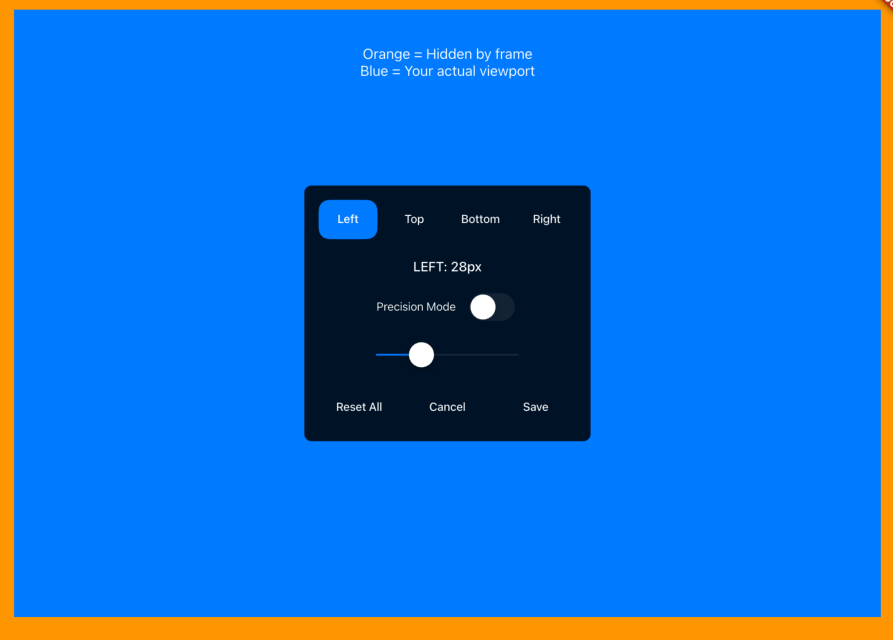
Depending on your frame or mount, part of the screen may be covered. Custom Margins pulls each edge in independently, so the slideshow only uses the visible area. Precision Mode fine-tunes it pixel by pixel.
Pro Tips #
- Place the frame away from direct sunlight to reduce screen glare and prevent overheating.
- Set up multiple tablets with the same NAS. Use the QR code feature for quick configuration.
Start Building Your Photo Frame
Download Pixette for free and turn your old tablet into a photo frame worth keeping around.